
Cookieless analytics with clear measurement boundaries
Understand your website’s recorded traffic without storing analytics cookies or persistent visitor identifiers in the browser. LiteStats keeps the collection model small and explains the tradeoffs in the reports.
How the LiteStats tracker works
The script creates a random identifier in JavaScript memory for the loaded document. It sends pageviews and, on paid plans, configured events to the LiteStats collector. It uses no cookies, localStorage, sessionStorage, fingerprinting or IP-derived visitor identifiers.
A reload or full navigation creates an unrelated identifier. SPA route changes can share the identifier while that document remains loaded. This lets LiteStats connect ordered events and route views within a document without recognising someone on a later visit.
Reports you can use day to day
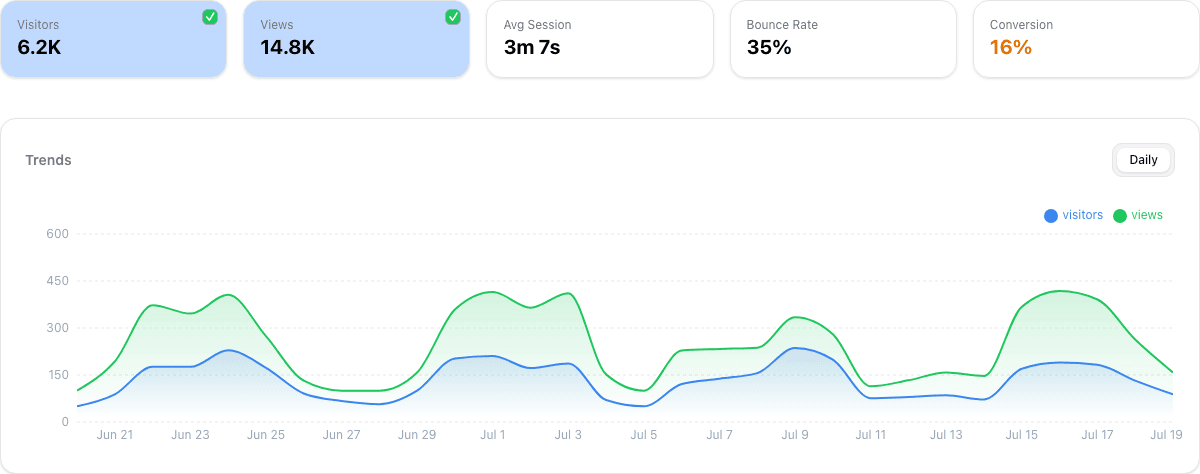
Review pageviews, visit estimates, popular paths, referring domains and device types in a single dashboard. Country is an approximate mapping from the browser time zone. Paths are filtered and query strings and fragments are stripped; referrers are reduced to hostnames. Approved campaign labels are handled separately for campaign reporting.
Starter adds custom events and MCP access. Pro adds campaign breakdowns, exports and funnels. Those funnels follow activity inside one loaded document. A traditional full-page navigation starts a different scope, so a multi-page signup flow cannot be treated as one tracked person’s journey. See the dashboard guide before choosing a conversion metric.
What does “Visitors” mean without persistent IDs?
It estimates visits, rather than unique people. New data uses page-load IDs; historical data can include older session identifiers. Counts from these two eras have different boundaries. A person reloading a page can count again. “Live now” estimates recently active pages, rather than a headcount.
Time on page is estimated from intervals between consecutive recorded views. Exit pages and single-view visits cannot supply that interval. A missing sample is not evidence of zero engagement.
Does cookieless mean no consent is ever needed?
A product’s use of cookies is only one part of that decision. Review the data collected, your purpose, local requirements, infrastructure logs and the other services installed on your site. Filtering cannot guarantee that a path, event name or campaign label contains no personal information.
Our tracker does not store IP addresses in analytics rows, but network infrastructure still receives them. Hosting and proxy logs need separate configuration. The LiteStats account application also uses authentication cookies. Read our privacy policy and implementation guidance before describing your own setup.
A lightweight script, with evidence you can inspect
Script weight is one performance cost among many. Our analytics script benchmark publishes its protocol and downloadable measurements. It measures script transfer sizes under stated conditions; it does not establish zero impact on Core Web Vitals. Test your own pages before and after installation.
Start with one website on Free or review paid plans for events, MCP and Pro reports.
See whether LiteStats fits your website
Free includes one website, 1,000 monthly pageviews and 30-day rolling history. No credit card required.
Compare LiteStats plans